


If you’re researching screen printing equipment and supplies, you’re likely either starting your own print shop or expanding an existing operation. We understand the challenge of sorting through countless options while balancing quality needs with budget constraints. This comprehensive checklist ensures you invest in the right equipment from day one, whether you’re setting up a home-based operation or launching a commercial print shop.
A screen print shop requires specific equipment categories to operate successfully: printing presses (manual or automatic), curing systems (flash dryers and conveyor dryers), exposure units for screen preparation, washout booths for cleaning, screens with appropriate mesh counts, squeegees in various durometers, specialty inks (plastisol, water-based, or discharge), essential chemicals for screen preparation and reclaiming, blank apparel inventory, design software, personal protective equipment, and various consumables like tape and adhesives.
TL;DR Summary: Starting a screen print shop requires careful equipment selection across multiple categories. Core printing equipment includes manual presses ($249-$8,995) or automatic presses ($40,000-$100,000+), with production capacities ranging from 200-500 garments daily for manual printing to 3,000-5,000+ for automatic systems. Essential screen preparation tools include exposure units ($200-$3,366) and washout booths ($890). You’ll need various mesh counts (60-305) for different applications, squeegees in multiple durometers (50-80), and appropriate inks for your substrates. Chemicals for emulsion and cleaning, quality blank apparel sources, design software for artwork preparation, and comprehensive safety equipment round out your startup needs. Consumables like tapes and adhesives, proper storage solutions, and an efficient shop layout maximize productivity. Professional shops like Thrive Screen Printing demonstrate how proper equipment selection and workflow optimization can scale from small custom orders to high-volume production serving national clients.
Quick Tip: Start with a single-color manual press to master the fundamentals before investing in multi-color or automatic equipment. This approach saves money while you build skills and establish consistent order flow.
As we explore each equipment category in detail, you’ll discover specific recommendations for different business scales and production goals. The following sections break down exact specifications, pricing ranges, and selection criteria to help you make informed purchasing decisions that align with your screen printing business objectives.
What Are the Core Pieces of Equipment Required for Screen Printing?
Screen printing equipment forms the foundation of any successful print shop. The core pieces include printing presses, flash and conveyor dryers, exposure units, washout booths, pressure washers, and storage solutions. Each piece serves a specific function in transforming blank garments into finished products.
Starting costs range from $8,100-$32,200 with an average of $20,150 for small commercial operations, while entry-level hobby setups can begin at $200-$1,000. This section covers the essential equipment needed to launch your screen printing operation.
Which Types of Screen Printing Presses Should You Consider?
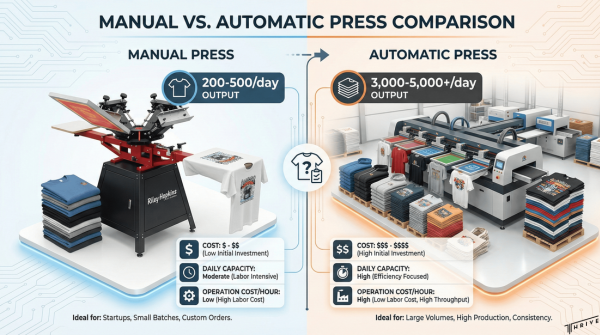
Screen printing presses are the centerpiece of any shop, ranging from manual entry-level units to high-speed automatic machines. Entry-level DIY kits range from $200-$315 for basic setups, suitable for hobbyists learning the craft.
Manual press options include:
- Riley Hopkins 150 Series: $249-$599 without micro-registration
- Riley Hopkins 250 Series: $1,459-$3,499 with XY micro-registration
- Riley Hopkins 360 Series: $4,895-$8,995 with XYZ micro-registration including Z-axis control
- 4-color manual presses: approximately $1,200 for small commercial operations
Automatic presses deliver higher production capacity but require significant investment. 4-color automatic presses start at $40,000 for professional production, while 10-color automatic units exceed $100,000 for high-volume operations.
Production capacity varies dramatically between manual and automatic systems. Manual presses produce 200-500 garments per day at $83 per print per hour operating cost. Automatic presses achieve 3,000-5,000+ garments daily at $68 per print per hour.
What Are the Essential Features of a Flash Dryer?
Flash dryers partially cure inks between colors on multi-color prints and gel single-color prints before conveyor drying. RyoFlash flash dryers cost approximately $795 for entry-level models with reliable performance.
Riley Flash Dryer models offer specific advantages:
- 16″x16″ models include rotating adjustable stands with locking casters
- 18″x24″ models feature large heating elements with even heat distribution
Flash units require either 120 or 220 volt power connections. Choose 220 volt models for faster heating and more consistent temperatures in commercial operations.
Why Is a Conveyor Dryer Necessary and How Do You Choose One?
Conveyor dryers properly cure inks to ensure wash durability and meet safety standards for plastisol and water-based inks. Small conveyor dryers start at $2,400 for basic models suitable for startup operations.
Popular conveyor dryer options include:
- Vastex D-100 Entry Level: 18″ wide belt, cures 110 plastisol-printed garments per hour
- Workhorse models: 52″ wide belts, 30,600 watts power, 1,000+ pieces/hour plastisol capacity
- Hix NPII 3610: $12,925 for professional-grade equipment
Operating costs range from $50-$100 monthly for typical operations. Most conveyor dryers require 220/230 volt power connections for proper operation.
How Do Exposure Units Impact Screen Preparation?
Exposure units burn photopolymer emulsion onto screens to create stencils for printing. Basic exposure units start at $895 for entry-level models, while advanced LED units offer superior consistency and longevity.
Available exposure unit options:
- RANAR CBX 2024 Analogue Timer: $700
- RhinoTech Tabletop BL1620: $700
- TECHTONGDA UV 24×28″: $200-$300
- Vastex E-200 LED: $2,746-$3,366
- Lawson LED-5000: available in 24″x31″ and 32″x48″ sizes
LED units provide more consistent exposure times, longer bulb life, and reduced heat generation compared to traditional fluorescent models.
What Kind of Washout Booth or Sink Do You Need for Cleaning Screens?
Washout booths remove unexposed emulsion from screens after UV exposure, creating the final stencil for printing. Washout booth setups cost approximately $890 for basic configurations with proper drainage and lighting.
Sgreen Washout Booth Filtration Systems provide eco-friendly ink waste removal, preventing chemicals from entering water systems while maintaining compliance with environmental regulations.
Why Is a Pressure Washer Important for Screen Reclaiming?
Pressure washers remove emulsion and ink residue from screens during the reclaiming process, allowing screens to be reused multiple times. Pressure washers for screen reclaiming cost approximately $925 for units with appropriate pressure and flow rates.
Proper pressure washing extends screen life and reduces long-term costs by enabling multiple screen uses rather than constant replacement.
What Are the Benefits of Using a Good Screen Racks and Drying Cabinet?
Screen racks and drying cabinets organize screens during production and provide controlled drying environments for wet emulsion. These systems prevent screen damage, improve workflow efficiency, and ensure consistent emulsion drying times.
Proper storage protects screens from dust, moisture, and physical damage while maintaining organized access during production runs. The combination of these essential equipment pieces creates a complete screen printing production environment capable of professional-quality output.
What Screens, Frames, and Mesh Types Do You Need to Begin?
Screens, frames, and mesh are foundational components for screen printing operations. Pre-stretched mesh screens cost $34 each, while screen printing equipment typically has 7-10 year useful life with proper maintenance. Screens can be reused multiple times with proper care and reclaiming processes.
Quality screens directly impact print consistency and production efficiency. The mesh count determines ink flow and detail resolution, while frame selection affects long-term operational costs. Pre-stretching ensures optimal tension for professional results.
This section covers mesh selection criteria, frame material comparisons, and pre-stretching benefits to help you choose the right screen components for your specific printing applications.
How Do You Select the Right Screen Mesh Count for Different Projects?
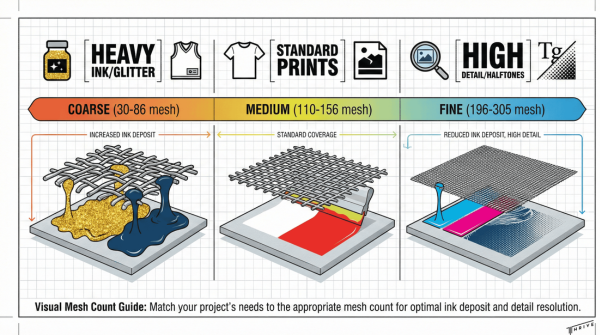
The right screen mesh count determines ink deposit thickness and print detail quality for each project type. Different mesh counts serve specific applications based on ink viscosity and desired print characteristics.
Coarse Mesh Applications (30-86 mesh):
- 30-61 mesh handles high density and glitter inks with thick specialty plastisol formulations
- 60 mesh works most commonly for thick specialty plastisol applications
- 80-86 mesh accommodates metallic inks, athletic wear, and heavy underbases to prevent dye migration
Standard Range Applications (110-156 mesh):
- 110-135 mesh serves as industry standard for wide range of applications from text to spot colors
- 156 mesh provides higher quality images with perfect balance of quality and ink deposit for fine lines and smaller text
Fine Detail Applications (196+ mesh):
- 196+ mesh prevents thin inks from bleeding and works ideally for neck tags and lighter inks on dark fabric
- 230 mesh handles halftones, detailed simulated process, and complex images
- 305 mesh achieves super fine detail, halftone images, and reduces dot gain
Plastisol inks work with 110-305 t/in monofilament mesh across most applications. The next section examines frame materials that support these mesh selections.
What Materials Are Commonly Used for Frames and Which Should You Choose?
Frame materials impact both initial costs and long-term operational efficiency for screen printing operations. The two primary frame types offer different advantages based on production requirements and budget considerations.
Static Frame Characteristics:
- Static frames (stretch & glue) are most common for non-standardized sizes
- Offer lower cost option for budget-conscious operations
- Single-use design with permanent mesh attachment
Retensionable Frame Advantages:
- Retensionable frames allow adjustment of mesh tension as needed
- Cost 2-3 times more than static frames but prove more economical long-term
- Reusable design for detailed projects requiring high precision
- Enable tension adjustments as mesh naturally loosens over time
Retensionable frames provide superior value for high-volume operations despite higher upfront costs. The ability to adjust tension maintains print quality consistency throughout extended production runs.
Proper mesh tensioning through pre-stretching creates the foundation for professional print quality across all frame types.
Why Does Pre-stretching Mesh Matter for Print Quality?
Pre-stretching mesh eliminates initial tension variations that cause print quality inconsistencies during production runs. This process ensures uniform mesh tension across the entire screen surface before mounting to frames.
Pre-stretched mesh provides immediate production readiness without the settling period required for manually stretched screens. The consistent tension prevents ink bleeding, maintains registration accuracy, and enables precise detail reproduction across multiple prints.
Professional pre-stretching also extends screen lifespan by preventing premature mesh fatigue from uneven stress distribution. This investment in quality components supports consistent output and reduces production delays from screen-related issues.
Quality screens with proper mesh selection and tensioning create the foundation for successful ink application and finishing processes in your screen printing workflow.
What Squeegees and Tools Are Necessary for Printing?
Squeegees and hand tools form the foundation of quality screen printing operations. The right squeegee durometer and proper accessories directly impact print quality, production speed, and final product durability. Professional shops require specific tool categories to maintain consistent output and efficient workflow.
How Do Different Squeegee Blades Affect Print Results?
Different squeegee blades produce distinct print characteristics based on their durometer ratings and construction. The durometer rating determines ink deposit thickness, edge sharpness, and compatibility with various ink types and mesh counts.
Squeegee Durometer Guide:
| Durometer | Color | Best Applications | Ink Deposit | Detail Level |
| 50 (soft) | Orange | Glitter printing, heavy deposits | Maximum | Low |
| 60 (soft) | White | Thick plastisol inks | Heavy | Low-Medium |
| 70 (medium) | Green | All-purpose printing | Medium | Medium |
| 80 (hard) | Gray | Fine details, high resolution | Light | High |
| 65/90/65 | Red/White | Multi-purpose applications | Variable | Variable |
Plastisol inks require 65-70 durometer squeegees for optimal performance. Sharp squeegee edges prove critical for quality prints—dull edges create inconsistent ink deposits and poor registration. Triple durometer squeegees (65/90/65) offer versatility by combining soft outer layers with a firm center core.
This squeegee selection directly impacts your screen mesh choice and overall print quality standards.
What Hand Tools and Accessories Should Every Shop Have?
Essential hand tools ensure smooth production workflow and proper screen maintenance. These accessories support every stage from screen preparation through final cleanup and quality control.
Required Hand Tools:
- Scoop coaters for applying emulsion to screens evenly
- Screen tape for masking unwanted printing areas
- Ink spatulas for mixing and handling inks safely
- Platen adhesive for securing garments during printing
- Digital non-contact laser thermometers for temperature monitoring
- Platen tape for protecting printing surfaces
- Scrub brushes for effective screen cleaning
Scoop coaters create consistent emulsion thickness across screen surfaces, while screen tape prevents ink bleeding beyond design boundaries. Digital thermometers ensure proper curing temperatures, particularly important since plastisol inks require 320°F curing temperatures. Quality ink spatulas prevent contamination during color mixing and reduce waste.
These tools bridge the gap between screen preparation and the ink selection process, setting up successful printing operations.
What Inks and Chemicals Are Needed for Screen Printing?
Screen printing inks and chemicals form the foundation of every successful print job. Essential supplies include plastisol inks, water-based alternatives, cleaning chemicals, and specialized emulsions that determine print quality and durability.
What Types of Screen Printing Inks Are Essential to Stock?
The types of screen printing inks essential to stock include plastisol, water-based, UV, metallic, and specialty formulations. Plastisol inks dominate the industry with durometer ranges of 40-80 Shore-A and curing temperatures averaging 320°F, though rapid cure versions cure as low as 270°F. These thermoplastic inks offer excellent opacity and work with 110-305 t/in monofilament mesh.
Water-based inks consist of water, pigment, and binder components. Water-based inks work best on medium-mesh screens and provide a softer feel than plastisol while serving as eco-friendly alternatives with fewer VOCs.
Specialty inks expand printing capabilities:
- UV inks offer rapid curing under UV light and suit hard goods applications
- Metallic inks require 80-86 mesh based on manufacturer recommendations
- High-density inks create thick, raised surfaces on garments
- Discharge inks can be made with sodium alginate, water, and discharge additive
The Revive Ink Line by Wilflex provides true plastisol ink made from 50% bio-derived content for environmentally conscious operations. FDA formulas are available for food contact applications, while NSF approval supports medical device manufacturing.
This ink variety ensures new shops can handle diverse client requests from basic apparel to specialized industrial applications.
Which Chemicals Are Needed for Emulsion Removal and Cleaning?
The chemicals needed for emulsion removal and cleaning include eco-friendly wash solutions, emulsion strippers, and ink degraders. Sgreen Supreme Wash provides eco-friendly wash solutions for environmentally conscious operations, while Aqua Wash offers water-based wash options for standard cleaning protocols.
Essential cleaning chemicals include:
- Ink Degrader helps break down stubborn inks that resist standard washing
- Emulsion Stripper removes emulsion from screens during reclaiming processes
These chemicals enable proper screen reclaiming and maintenance, extending screen life and maintaining print quality. Proper chemical selection reduces environmental impact while ensuring thorough cleaning for consistent production results.
Why Are Emulsion and Emulsion Coaters Important?
Emulsion and emulsion coaters are important because they create the stencil that controls ink transfer and determines image quality. Direct emulsion with high-solids (45% solids) is recommended for quality results, providing superior detail reproduction and durability.
Available emulsion options include:
- Presensitized emulsion for convenience in high-volume operations
- BaseLayr Long Lasting Emulsion provides durability for extended print runs
- Chromaline CP Tex Water-Resistant Photopolymer Emulsion offers water resistance for challenging applications
Proper emulsion selection and application through quality coaters ensures consistent stencil formation, sharp image edges, and optimal ink deposit control. These materials directly impact print resolution, registration accuracy, and overall production efficiency in screen printing operations.
What Garments and Substrates Should You Prepare for Printing?
The garments and substrates you prepare for screen printing determine your shop’s versatility and market reach. Quality blank apparel forms the foundation of successful prints, while diverse substrates expand your service offerings beyond traditional textiles.
How Do You Source Quality Blank Apparel for Printing?
Quality blank apparel sourcing requires evaluating fabric weight, fiber composition, and garment construction. Cotton garments provide excellent ink adhesion and durability, while cotton-polyester blends offer moisture-wicking properties for athletic wear. Popular wholesale suppliers such as Bella+Canvas, Next Level Apparel, and Gildan offer consistent quality at competitive prices.
Consider fabric weight when selecting garments: 4.5-5.5 oz shirts work well for retail applications, while 6-7 oz garments provide premium feel and longevity. Pre-shrunk fabrics prevent sizing issues after printing and washing. Ring-spun cotton creates smoother surfaces than open-end cotton, producing sharper print details.
Establish relationships with multiple suppliers to ensure consistent inventory availability. Order sample packs to test print quality across different brands and styles. Stock popular sizes (S-XL) in neutral colors like white, black, and heather gray as your core inventory base.
What Non-Apparel Items Can Be Printed with Screen Printing?
Non-apparel substrates expand your screen printing capabilities beyond traditional garments into promotional products and specialty applications. Tote bags, canvas pouches, and shopping bags accept plastisol and water-based inks effectively when using 110-156 mesh screens for optimal coverage.
Paper products including posters, cardstock, and packaging materials work well with UV-curable inks that cure rapidly under LED exposure units. Metal substrates such as aluminum signs, license plates, and promotional items require specialty inks formulated for adhesion to non-porous surfaces.
Promotional items like mouse pads, koozies, and banners utilize screen printing for cost-effective customization. Glass and ceramic surfaces accept screen printing with appropriate inks and curing methods, though these require careful temperature control during the curing process.
This versatility positions your shop to serve diverse markets beyond apparel, from corporate promotional campaigns to specialized industrial applications.
What Software and Design Tools Are Standard in Screen Print Shops?
Professional screen print shops rely on specialized software and design tools to create print-ready artwork and manage color separations. The right combination of graphic design programs and artwork preparation tools ensures accurate color reproduction, proper registration, and efficient production workflows. Understanding these standard industry tools helps new shop owners select appropriate software packages and establish professional design capabilities.
Which Graphic Design Programs Do Professional Screen Printers Use?
Professional screen printers use Adobe Creative Suite programs as the industry standard for artwork creation and file management. Adobe Illustrator serves as the primary tool for vector-based designs, logos, and text elements that require crisp edges and scalable graphics. Adobe Photoshop handles raster images, photo manipulation, and complex artwork that involves gradients or photographic elements.
CorelDRAW provides an alternative vector graphics solution that many screen printers prefer for its intuitive interface and built-in color separation tools. The software includes specialized features for textile printing, such as automatic spot color identification and simplified separation workflows.
Specialized screen printing software includes AccuRIP for film output management and FastFilms for creating accurate film positives. These programs optimize artwork specifically for screen printing requirements, ensuring proper dot gain compensation and film density for quality screen exposure.
RIP software (Raster Image Processor) controls inkjet printers used for film output, managing color profiles and ensuring consistent film quality. Popular RIP solutions include Wasatch SoftRIP and ErgoSoft RIP for professional film production capabilities.
The combination of design software and specialized printing tools creates a comprehensive workflow from initial concept to final film output, supporting both simple spot color designs and complex multi-color separations.
How Do You Prepare Artwork and Separations for Printing?
Artwork preparation for screen printing begins with converting designs into spot colors and creating individual color separations for each ink layer. Each color in the design requires a separate film positive that corresponds to one screen in the printing process, with black areas representing where ink will pass through the mesh.
Color separation techniques vary based on design complexity, with spot color separations used for simple designs with distinct color areas. Process color separations (CMYK) handle full-color photographs and complex gradients, requiring halftone screens and precise registration between multiple colors.
File preparation includes setting proper resolution at 300 DPI for raster elements while maintaining vector graphics for crisp text and line art. Artwork must include registration marks, color callouts, and proper bleed areas to ensure accurate alignment during printing.
Halftone creation involves converting continuous tone images into printable dot patterns, with mesh count selection affecting dot size and image quality. Lower mesh counts (110-156) handle larger dots for bold graphics, while higher mesh counts (230-305) accommodate fine detail and smaller dots.
Film output requires positive films printed with sufficient density for proper screen exposure, typically achieving 3.5-4.0 optical density on black areas. Each separation film must align precisely with registration marks to maintain color registration during the printing process.
Quality control includes checking separations for proper trap, ensuring adequate overlap between adjacent colors, and verifying that all design elements translate correctly to the separated films before screen preparation begins.
This section establishes the foundation for professional artwork creation and preparation that directly impacts print quality and production efficiency in the subsequent screen preparation and printing stages.
What Personal Protective Equipment and Safety Supplies Are Required?
Personal protective equipment and safety supplies form critical foundations for screen printing operations. Screen print shop operators face significant workplace hazards that require comprehensive safety protocols to prevent injuries and ensure regulatory compliance.
What PPE Should Be Used to Protect Employees in a Screen Print Shop?
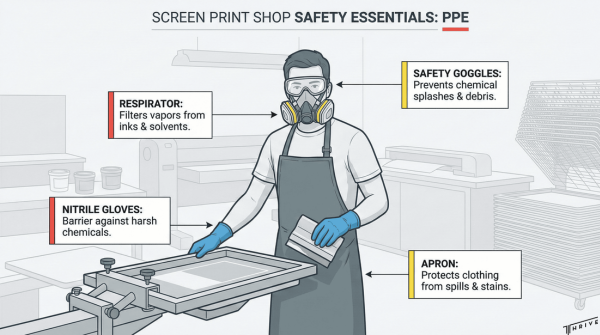
PPE requirements for screen print shops include respiratory protection, hand protection, eye safety gear, and protective clothing. Screen press operators face exposure to organic vapors during ink mixing, printing, screen washing, and drying processes. Potential exposure includes solvents, inks, adhesives, organic and inorganic pigments, and polycyclic aromatic compounds that require specific protective measures.
Essential PPE components include:
- Respiratory protection: N95 or P100 masks for solvent vapor exposure
- Chemical-resistant gloves: Nitrile or neoprene for ink and solvent handling
- Safety glasses: Impact-resistant lenses with side shields for chemical splash protection
- Protective aprons: Chemical-resistant materials for body protection during cleaning operations
- Non-slip footwear: Closed-toe shoes with chemical-resistant soles
Industry safety data reveals concerning injury rates requiring immediate attention. Amputations account for 40-50 injuries per year in the printing industry, while at least 8 fatalities were reported in a recent year. Common injuries include cuts, lacerations, crush injuries, burns, and repetitive strain injuries. The printing industry shows higher-than-average injury rates compared to other manufacturing sectors, emphasizing the need for comprehensive PPE programs.
How Can You Ensure Proper Ventilation and Chemical Safety?
Proper ventilation and chemical safety protocols protect workers from harmful exposures while meeting regulatory requirements. Ventilation systems are recommended to clean air in screen printing facilities, with specific installation requirements for maximum effectiveness.
Ventilation system requirements include:
- Exhaust placement: Vents must discharge within property boundaries, not on public space
- Exterior screening: All vents require protective screening to prevent contamination
- Direct exhaust: Windowless rooms with presses must have exhaust built into outside wall
- Airflow calculation: Systems sized for complete air changes per hour based on facility volume
Chemical safety compliance follows Hazard Communication (HazCom) standards requiring proper labeling of all chemicals. Safety Data Sheets (SDS) must be maintained for all chemicals in the facility, providing emergency response information and exposure limits. Lockout/Tagout (LOTO) procedures prevent accidental machine start-up during maintenance operations, while machine guarding protects employees from moving machinery parts.
Comprehensive safety protocols combine proper PPE selection with effective ventilation systems and chemical management to create safer screen printing environments that protect workers and ensure regulatory compliance.
What Startup Supplies and Consumables Should You Always Have on Hand?
Startup supplies and consumables form the operational backbone of any screen print shop. These essential materials keep production running smoothly and ensure consistent print quality. A 2021 industry survey by the Specialty Graphic Imaging Association found that shops maintaining adequate consumable inventory experienced 34% fewer production delays compared to those operating with minimal stock levels.
The following sections detail the critical tapes, adhesives, cleaning materials, and shipping supplies that every screen printing operation requires for efficient daily operations.
Which Tapes, Pallet Adhesives, and Cleaning Rags Are Must-Haves?
Essential tapes, pallet adhesives, and cleaning rags are critical consumables that directly impact print quality and production efficiency.
Must-Have Tapes:
- Screen tape for masking unwanted areas during printing
- Platen tape for protecting printing surfaces from ink buildup
- Blockout tape for covering pinholes in screens
- Transfer tape for applying vinyl graphics
Pallet Adhesives and Application:
- Spray adhesives provide temporary garment positioning on printing platens
- Water-based pallet adhesives offer eco-friendly alternatives with easy cleanup
- High-tack adhesives work for challenging fabrics like fleece or textured materials
- Adhesive remover breaks down buildup and maintains platen surfaces
Cleaning Materials:
- Lint-free shop rags prevent fiber contamination during screen cleaning
- Microfiber cloths effectively remove emulsion residue without scratching screens
- Paper towels handle general cleanup and ink spills
- Disposable wipes containing solvents provide convenient spot cleaning
According to a 2020 study by the Screen Printing Technical Foundation, shops using proper cleaning protocols experienced 28% fewer screen defects and extended screen life by an average of 40 uses per screen.
These consumables require regular restocking to prevent production interruptions and maintain consistent print standards.
What Shipping and Packing Materials Will You Need for Orders?
Shipping and packing materials protect finished products during transit and create professional customer experiences that build brand reputation.
Primary Packaging Materials:
- Poly mailers in multiple sizes accommodate various garment quantities
- Corrugated boxes provide rigid protection for bulk orders and fragile items
- Tissue paper adds professional presentation for premium orders
- Clear plastic bags protect individual garments from moisture
Protective Materials:
- Bubble wrap cushions delicate prints and prevents shifting during transport
- Packing peanuts fill void space in oversized boxes
- Air pillows provide lightweight cushioning for standard shipments
- Kraft paper offers eco-friendly wrapping for sustainable packaging
Labeling and Documentation:
- Shipping labels with strong adhesive ensure proper delivery tracking
- Packing slips document order contents for customer verification
- Thank you cards enhance customer experience and encourage repeat business
- Return labels simplify exchange processes and improve customer satisfaction
A 2019 e-commerce packaging study revealed that 73% of customers form brand impressions based on packaging quality, making professional packing materials essential for customer retention and referrals.
Adequate inventory of these materials prevents shipping delays and maintains the professional image that screen printing businesses require for long-term success.
How Can You Create an Efficient Workspace and Shop Layout?
Creating an efficient workspace requires strategic planning that minimizes movement, reduces production time, and maintains safety standards. Proper shop layout directly impacts your daily production capacity and operational costs.
The following sections detail specific organization strategies and storage solutions that maximize productivity while keeping supplies accessible and secure.
How Should You Organize Your Screen Print Shop for Productivity?
Organizing your screen print shop for productivity centers on creating a logical workflow that minimizes unnecessary movement and maximizes production efficiency.
Central Press Placement and Movement Flow
Place your t-shirt press in a central location for efficient access from all work areas. Ensure plenty of room to move around the press without squeezing or constant bumping into equipment or walls. This positioning reduces operator fatigue and prevents accidental damage to screens or printed garments.
Dryer Positioning for Seamless Production
Keep your conveyor dryer close to the printing machine to minimize steps between stations. The ideal setup allows pivoting in place to drop shirts directly onto the conveyor belt without walking across the shop floor. Reduce the distance between press and dryer to prevent accidental contact with wet ink, which can ruin prints and waste materials.
Material Flow Organization
Organize your workspace so art, screens, and shirts flow from point A to B without resistance or backtracking. Create designated zones for:
- Incoming blank garments
- Screen preparation and coating
- Printing station
- Curing and finishing area
- Quality control inspection
- Packing and shipping
Production Management Systems
Track your production timeline with an organized, shareable production calendar that all team members can access. Have everything ready before each job reaches the press, including properly tensioned screens, mixed inks, and prepped garments.
This systematic approach ensures smooth operations and helps identify bottlenecks before they impact delivery schedules.
What Storage Solutions Help Keep Supplies Accessible and Safe?
Storage solutions for screen printing shops must balance accessibility with safety while protecting valuable materials from damage and contamination.
Screen Storage and Organization
Install vertical screen racks that allow easy identification and access to different mesh counts and frame sizes. Pre-stretched mesh screens cost $34 each, making proper storage essential to prevent damage. Position racks near the exposure unit and washout booth to minimize handling time.
Chemical and Ink Storage Systems
Store inks and chemicals in temperature-controlled areas away from direct sunlight and heat sources. Use metal cabinets with proper ventilation for solvent-based products and ensure all containers maintain proper labeling per Hazard Communication (HazCom) requirements. Keep Safety Data Sheets (SDS) readily accessible for all stored chemicals.
Tool and Accessory Organization
Create dedicated storage for squeegees, scoop coaters, spatulas, and cleaning supplies using wall-mounted racks or drawer systems. Group tools by function: printing tools, cleaning supplies, and maintenance equipment should each have designated areas.
Garment and Substrate Management
Establish climate-controlled storage for blank apparel to prevent moisture damage and maintain fabric quality. Use shelving systems that allow FIFO (First In, First Out) inventory rotation and easy size/color identification.
Supply Inventory Control
Implement a system for tracking consumables like emulsion, tape, and adhesives with clear labeling and reorder points. Store frequently used items at eye level and within arm’s reach of primary work areas.
These storage solutions create a safer work environment while reducing time spent searching for materials, directly improving your shop’s productivity and profitability.
How Can Thrive Screen Printing Help You Get Started with Your Own Screen Print Shop?
Thrive Screen Printing provides comprehensive support for new screen printing businesses through equipment guidance, contract services, and industry expertise. The company operates from 40,000 square foot state-of-the-art facilities in Phoenix, Arizona, serving small businesses to large-scale global enterprise clients. New shop owners can leverage Thrive’s national recognition and experience to accelerate their startup process and avoid common pitfalls.
The following sections outline specific support options and essential equipment considerations for launching a successful screen printing operation.
What Support or Equipment Solutions Does Thrive Screen Printing Offer to New Screen Print Shops?
Thrive Screen Printing offers multiple pathways for new shop owners to enter the screen printing industry with reduced risk and startup costs.
Contract and Wholesale Services
- Contract screen printing allows new businesses to take orders without equipment investment
- Wholesale screen printing services enable reseller partnerships with established quality standards
- Custom band merch and custom merch services provide specialized market entry points
- Apparel fulfillment and finishing with custom clothing tags offer complete order processing
Technical Capabilities Available for Partnership
- Plastisol printing and water-based ink screen printing expertise
- DTG printing (direct to garment) capabilities for small-run orders
- Specialty printing techniques including foil, flock, gel, high-density, and metallic options
- Green printing alternatives for environmentally conscious client requirements
Design and Production Support
Thrive’s in-house design team has completed thousands of projects and processes tens of thousands of individual orders weekly. New shop owners can access professional design capabilities while building internal expertise. The company maintains consistency through multi-manual checking processes and ships products worldwide from USA facilities.
Contact Thrive Screen Printing at (602) 607-1291 or info@thrivescreenprinting.com to discuss partnership opportunities and startup support options.
What Are the Most Important Points to Remember When Equipping a Screen Print Shop?
The most important points for equipping a screen print shop focus on strategic investment timing, equipment selection, and operational planning to maximize return on investment.
Investment Strategy and Timing
- Start with entry-level setups ranging from $200-$1,000 for hobby operations before scaling
- Plan for small commercial operations with total startup costs of $8,100-$32,200 (average $20,150)
- Avoid overbuying equipment until mastering manual printing and securing consistent orders
- Consider that professional industrial setups with automatic presses can exceed $100,000
Essential Equipment Progression
Begin with a 1-color press to learn fundamental techniques before expanding capabilities. The Riley Hopkins 150 series provides an excellent starting point for beginners. Invest in LED exposure units for longevity and efficiency over traditional lighting options. Select trusted equipment brands that offer reliable support and service networks.
Financial Performance Targets
| Metric | Target | Calculation Method |
| Gross Margin | 80% | (Revenue – Direct Costs) / Revenue × 100 |
| ROI | Variable | (Net Profit / Total Investment) × 100 |
| Print Durability | 5-10 years | Normal clothing use conditions |
| Outdoor Applications | 1-5 years | Based on quality and UV exposure |
Maintenance Requirements
Implement daily maintenance routines including cleaning screens, squeegees, and floodbars after each production run. Schedule professional equipment service once or twice yearly to ensure optimal performance and extend equipment longevity.
This strategic approach to equipment investment and operational planning helps new screen printing businesses achieve sustainable growth while minimizing financial risk.

Robert Fisher is the founder and CEO of Thrive Screen Printing and brings extensive experience in the screen printing and fulfillment industry.